The mission: modernize without breaking continuity – How I migrated ADS-B Exchange and FlightAware feeding from Pi3 to Pi5
I treated the change as a small production migration rather than a hobby-box reinstall. The old Raspberry Pi and its storage remained untouched and rollback-ready while I built the replacement in parallel. Only after the new system was prepared would I stop the old receiver, move the two USB software-defined radios, and bring the new station online.
The migration objectives were straightforward:
- Move the receiver stack to a Raspberry Pi 5.
- Use a clean 64-bit Raspberry Pi OS Lite installation rather than a preconfigured PiAware image.
- Preserve the existing FlightAware site and feeder identity.
- Restore both 1090 MHz Mode S/ADS-B and 978 MHz UAT reception.
- Restore FlightAware MLAT.
- Add ADS-B Exchange without disrupting FlightAware.
- Enable ADS-B Exchange statistics and MLAT.
- Verify that every required service would start automatically after a reboot.
The old Pi and storage card were my escape hatch. If the new build failed, I could reconnect the SDRs and return to the known configuration. That rollback plan mattered because the goal was a hot migration with minimal downtime—not an afternoon-long airborne science fair.
Why I skipped the preconfigured PiAware image
FlightAware offers a preconfigured Raspberry Pi image that is an excellent choice for a simple dedicated receiver. I deliberately chose Raspberry Pi OS Lite 64-bit and installed the individual receiver components instead.
That approach takes more work, but it fits the way I manage infrastructure. The host remains a normal Debian-based Linux system. Each decoder, feeder, map, and MLAT client is a visible service. I can inspect the process, its configuration, its listening ports, its network connections, and its logs independently.
The result is not as appliance-like, but it is much easier to reason about when something fails. Reimaging a card can fix a problem; understanding the data path tells me why it was broken.
Keeping two identical SDRs from stealing each other’s jobs
The receiver uses two USB RTL-SDR devices:
- 1090 MHz SDR: serial number
00001000 - 978 MHz UAT SDR: serial number
00000001
Those serial numbers are not decorative. Two otherwise identical RTL-SDRs can appear in a different USB order after a reboot. Binding each decoder to a unique serial number prevents the 1090 MHz service from grabbing the UAT receiver—or vice versa—and producing the exciting diagnostic condition known as “everything is running and nothing makes sense.”
The finished local architecture looked like this:
dump1090-fadecoded 1090 MHz traffic and exposed Beast data on TCP port30005.dump978-fadecoded 978 MHz UAT traffic and exposed data on TCP port30978.skyaware978provided the local 978 MHz web display.- PiAware consumed both decoder streams and sent them to FlightAware.
- FlightAware’s MLAT client consumed 1090 MHz timing data and returned calculated positions to
dump1090-faon port30104.
The important design principle is that the radio decoders and the internet feeders are separate layers. A local map can work while an external feed is broken. A feeder process can be active while its decoder is producing nothing. Each layer has to be tested on its own.
Restoring FlightAware
FlightAware was the first external service brought online. I restored the existing feeder identity rather than claiming a new receiver. That allowed FlightAware to associate the new hardware with the established Mineral-area site and preserve its history.
Validation happened in layers:
- Confirm Linux detected both RTL-SDR devices.
- Confirm each decoder had claimed the correct serial-numbered receiver.
- Confirm
dump1090-fawas listening on30005. - Confirm
dump978-fawas listening on30978. - Confirm PiAware’s 1090 and 978 helper processes connected to those local ports.
- Confirm PiAware established an encrypted session with FlightAware.
- Confirm the provider-side dashboard received both Mode S and UAT messages.
The distinction between “service active” and “data flowing” was especially important. A green systemctl status only says the process has not exited. The logs proved that PiAware was receiving messages from both decoders and successfully sending them to FlightAware.
FlightAware MLAT and the meaning of altitude
ADS-B-equipped aircraft transmit their own GPS-derived positions. Some Mode S aircraft do not. Multilateration, or MLAT, estimates the location of those aircraft by comparing the precise arrival time of their transponder replies at multiple synchronized receiver sites.
That calculation depends on an accurate receiver location and antenna elevation. FlightAware showed my antenna at 498 feet above mean sea level. The antenna is approximately 30 to 32 feet above ground level, while the property is roughly 466 feet above sea level. Those figures reconcile neatly.
This is an easy place to make a configuration mistake: MLAT wants the antenna’s elevation above mean sea level, not merely the height of the mast above the yard. Entering “30 feet” would be precise, repeatable, and completely wrong.
With the established location and elevation in place, FlightAware MLAT connected, synchronized, and returned results to the local decoder. The dashboard went from a red MLAT indicator to three green blocks: PiAware, FlightAware, and MLAT.
Adding ADS-B Exchange
Once FlightAware was stable, I added ADS-B Exchange as a second consumer of the same local decoder data. This is one of the advantages of separating reception from feeding: the SDRs decode the radio traffic once, and multiple feeder services can consume the resulting local streams without fighting over the hardware.
The ADS-B Exchange feeder connected to:
127.0.0.1:30005for 1090 MHz Beast input;127.0.0.1:30978for 978 MHz UAT input.
Locally, the service was active and both decoder connections were established. It also had an outbound TCP session to ADS-B Exchange. That appeared to be a successful installation.
The web diagnostics told a more interesting story.
Connected, but not fully associated
ADS-B Exchange reported ADS-B Connected / Feed OK, so the aircraft data was reaching their network. However, the receiver-specific statistics and “Anywhere” map were unavailable. The diagnostics showed no feeder UID association and no statistics package.
This was not a radio, decoder, firewall, or outbound-feed problem. The raw feed worked. What was missing was the companion statistics service that associated the receiver with a feeder record and provided the personalized map and statistics views.
After installing the official ADS-B Exchange statistics package, a new adsbexchange-stats service appeared. It was enabled at boot, started normally, and populated the feeder UID, statistics link, and receiver-specific map.
This was a useful troubleshooting reminder: provider-side diagnostics can distinguish between the transport path and the account or statistics path. Had I treated every red indicator as “the feed is down,” I could have wasted time rebuilding a working connection.
ADS-B Exchange MLAT was a separate service
At that stage, ADS-B Exchange showed the ADS-B feed and statistics in green, but MLAT still showed “Not Found.” That was expected: I had deliberately left the ADS-B Exchange MLAT service masked while validating the basic feed.
After confirming the correct antenna elevation, I set ADS-B Exchange MLAT to 498ft, unmasked the service, and enabled it at boot. The MLAT client then:
- connected to the 1090 MHz Beast stream on
127.0.0.1:30005; - completed its handshake with the ADS-B Exchange MLAT server;
- returned Beast-format MLAT results to
dump1090-faon port30104; - returned a second MLAT result stream to the ADS-B Exchange feeder on port
30154.
ADS-B Exchange then confirmed both ADS-B Connected and MLAT Connected. The final green provider-side status mattered more than simply seeing a local process in memory.
The finished service stack
By the end of the migration, seven primary services had to be both enabled and active:
dump1090-fa
dump978-fa
skyaware978
piaware
adsbexchange-feed
adsbexchange-mlat
adsbexchange-stats
I used a simple audit loop to check runtime state and boot enablement together:
for service in \
    dump1090-fa dump978-fa skyaware978 piaware \
    adsbexchange-feed adsbexchange-mlat adsbexchange-stats; do

    printf '%-22s enabled=%-12s active=%s\n' \
        "$service" \
        "$(systemctl is-enabled "$service" 2>&1 || true)" \
        "$(systemctl is-active "$service" 2>&1 || true)"
done
That check is intentionally boring. Boring is good. The goal was seven services reporting enabled and active, with the logs and network connections confirming that each one was doing useful work.
The local maps proved the radios were alive
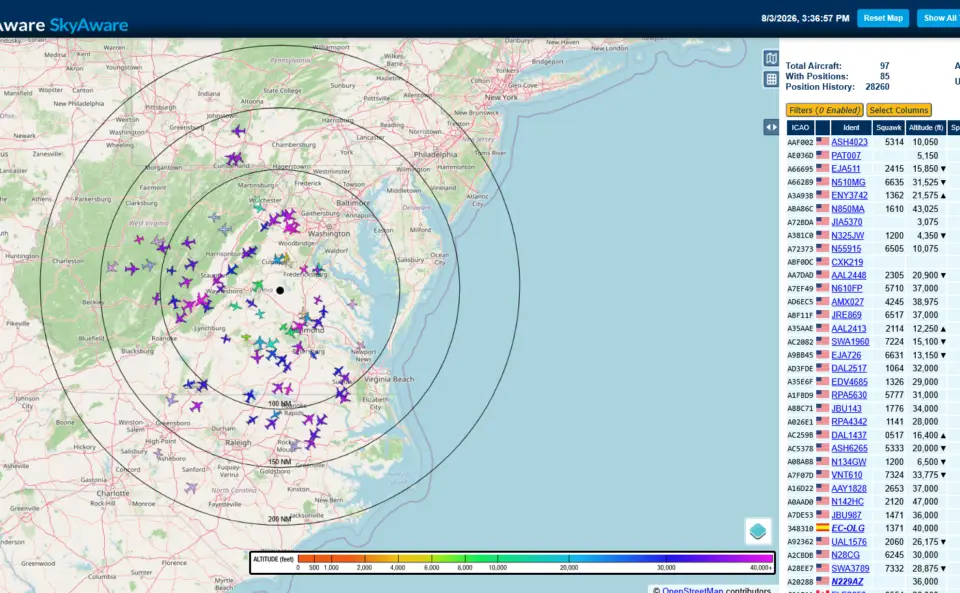
The provider dashboards proved data had crossed the internet. The local SkyAware interfaces proved the receiver itself was decoding traffic. SkyAware’s 1090 MHz map showed dozens of aircraft across Virginia and the surrounding region, while the 978 MHz interface showed UAT traffic from appropriately equipped aircraft.
Neither view alone was enough to validate the whole system. Together, the local maps, listening ports, process connections, service logs, and provider dashboards created an end-to-end chain of evidence from antenna to internet service.
The scary-looking placeholder page that was not a problem
Browsing directly to the receiver’s root IP address displayed Lighttpd’s default placeholder page. On a preconfigured PiAware image, the root web page may be customized. On my clean Raspberry Pi OS installation, nothing replaced the stock document root.
The page had no effect on dump1090-fa, dump978-fa, SkyAware, PiAware, either external feed, or MLAT. It was cosmetic. The browser’s “Not Secure” warning was also expected because this was plain HTTP on a private LAN address, not a public website.
In other words, the receiver was operating normally; Lighttpd was merely answering the front door in its Debian-issued cloak.
The real acceptance test: reboot it
A system that works only because an administrator manually restarted services is not repaired; it is enjoying supervised visitation. The real acceptance test was a controlled reboot.
After the Raspberry Pi returned, Linux detected both SDRs, the serial-number assignments held, and all seven services started automatically. The ADS-B Exchange feeder briefly logged DNS resolution failures during early boot, then connected to its alternate endpoint within seconds as networking settled. Its MLAT client behaved similarly and completed a normal handshake.
FlightAware re-established its encrypted session, both local decoders produced data, the provider dashboards returned to green, and ADS-B Exchange MLAT reported a healthy peer count. No manual restart or cable shuffle was required.
That changed the project status from “working right now” to operational. There is a difference.

What I would do the same way again
- Keep the old system rollback-ready. Do not erase the known-good card before the replacement proves itself.
- Build in parallel. Prepare the operating system, packages, network, and identities before moving the SDRs.
- Assign unique SDR serial numbers. Never depend on USB enumeration order when two receivers have different jobs.
- Validate in layers. Check hardware, decoders, ports, feeders, MLAT, statistics, and provider dashboards separately.
- Preserve feeder identity. A hardware migration does not require abandoning the site’s history or statistics.
- Use antenna elevation above mean sea level for MLAT. Mast height above the ground is only one part of the calculation.
- Check enablement as well as activity. A manually started service can be perfectly healthy until the next power interruption.
- Reboot before declaring victory. It is better to discover ordering, DNS, or USB problems while you are still watching.
Final architecture
The completed Raspberry Pi 5 receiver now provides:
- 1090 MHz Mode S and ADS-B reception;
- 978 MHz UAT reception;
- local SkyAware displays;
- FlightAware feeding and FlightAware MLAT;
- ADS-B Exchange feeding, statistics, personalized mapping, and MLAT;
- automatic recovery of the full service stack after reboot;
- a clean, maintainable 64-bit Debian-based foundation.
Most importantly, the migration preserved the established FlightAware site and its multi-year feeding streak. The receiver gained modern hardware, current software, an additional independent feed, and a configuration I can troubleshoot one layer at a time.
The old Pi did its job for years. The new Pi now has the watch.
Technical note: This post documents the architecture and troubleshooting decisions from my August 2026 migration. Package names, repositories, and installation scripts can change. For a new installation, use the current official guidance from FlightAware and ADS-B Exchange rather than copying an old command sequence blindly.